
Workflow Automation Services: How to Connect Intake, CRM, Documents, and Follow-Up
Quick answer
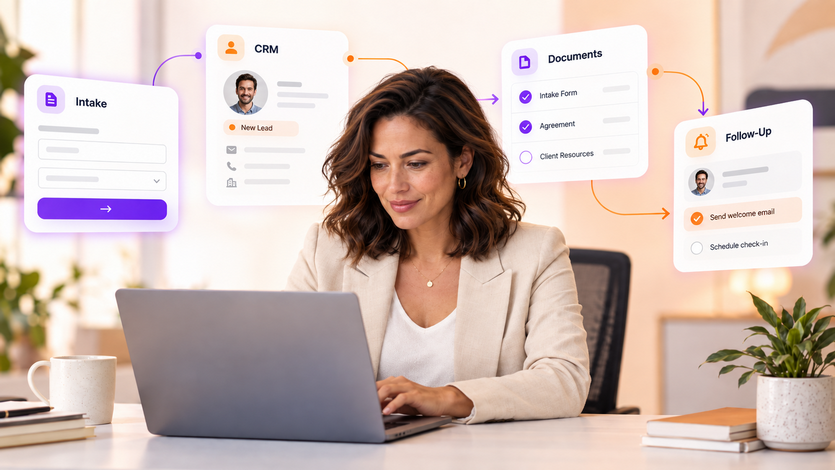
Workflow automation services connect the events, data, systems, rules, AI steps, and human decisions that move work from one stage to the next. A high-value pattern is intake → qualification → CRM → document collection → staff review → follow-up. The workflow should use one system of record, explicit status states, deterministic rules for critical actions, and AI only where interpretation or generation adds value.
Many automation projects fail at the handoff between tools. A form captures information, yet a staff member still retypes it into the CRM. The CRM stores the record, yet document requests happen through separate email threads. Then follow-up depends on personal reminders. So the problem isn't a missing automation feature. The problem is a disconnected workflow.
Workflow automation services solve this by designing the process end to end. First, the team defines the event that starts work. Next, it decides where the authoritative record lives. Then it connects documents, communications, tasks, approvals, AI processing, and human review to explicit workflow states. As a result, each system knows what to do next, and employees can see where work stands.
AI can improve this architecture when the workflow includes unstructured language or documents. For example, a model can classify an inquiry, summarize a long email, extract information from a document, or draft a context-aware follow-up. However, deterministic rules should control permissions, record creation, required-field checks, state changes, deadlines, and other actions that need predictable behavior.
What Are Workflow Automation Services?
Workflow automation services are the design and implementation work required to make a multi-step business process run consistently across people and systems. The service goes beyond creating a single trigger. It maps the full process, connects systems, handles exceptions, defines human approvals, tests real cases, and creates ongoing operational ownership.
A Reference Workflow: Intake to CRM to Documents to Follow-Up
The following pattern applies to law firms, professional services, healthcare administration, insurance operations, agencies, and many other service businesses. Details vary by industry, but the underlying steps remain similar. Specifically, work arrives, the business qualifies it, creates or updates a record, collects missing information, routes the item for review, communicates status, and closes or advances the workflow.
Step 1: Map Intake as a Structured Event
The workflow should treat intake as creating a structured business event, even when the request arrives through unstructured channels. For example, an inbound email may contain a name, company, matter type, deadline, free-text question, and attachments. AI can extract and classify those elements, then pass structured fields into the workflow. Next, validation rules can check what information is still missing.
In addition, the intake design should assign a unique identifier early. That identifier can connect later emails, documents, CRM records, tasks, and status events. As a result, the automation can avoid creating duplicate work when someone replies through a different channel or submits another document.
- Define required fields. Specify the minimum data needed before the workflow can advance.
- Define urgent conditions. Create an immediate human escalation path for time-sensitive or high-risk requests.
- Define allowed AI behavior. Separate information collection and categorization from decisions that require staff judgment.
- Create a duplicate-check strategy. Use identifiers and matching rules before creating a new system-of-record entry.
- Record consent and communication preferences where relevant. Keep required permissions tied to the authoritative record.
Step 2: Make the CRM the Workflow State Machine
The CRM or another designated system of record should hold the status that tells the workflow what happens next. For instance, a record might move through New, Needs Information, Qualified, Under Review, Waiting on Documents, Ready for Decision, Follow-Up Due, and Closed. Because each status has a clear meaning, the automation can trigger appropriate actions and employees can understand the queue.
However, status fields only work if the business defines who can change them and under what conditions. Therefore, the implementation should document state transitions. A new intake may move to Needs Information when a required document is missing. A staff reviewer may move it to Qualified after human review. Then the workflow can create the next task and send the appropriate message.
Step 3: Connect Document Collection to the Record
Document workflows become inefficient when attachments live in separate email threads and staff manually decide what is missing. Instead, the automation can generate a checklist based on the intake type, track which items arrive, associate each file with the record, and update document status. AI can help classify files or extract metadata, while the system retains the original source for verification.
For example, a law firm may need different document checklists for different practice areas. A professional-services firm may need contracts, prior reports, and account documentation. Therefore, the workflow should generate the request from approved business rules rather than rely on a generic list for every case.
Additionally, access controls should follow the source system. The automation should not create a broad document repository simply because the AI component can read it. Instead, the architecture should preserve matter-, account-, department-, or user-level access requirements whenever the underlying platforms support them.
Step 4: Use AI to Prepare Work for Human Review
AI can reduce preparation time before a reviewer opens the item. Specifically, it can summarize the intake, list missing facts, organize documents, extract a timeline, or surface relevant internal knowledge. Then the reviewer can see the structured record and the supporting sources together. As a result, the human decision becomes faster to verify and easier to audit.
At the same time, the implementation should define which outputs count as assistance and which actions require approval. An AI-generated summary can support a reviewer, while a final legal, financial, employment, or other high-impact decision may require an authorized person. Therefore, the workflow should capture that approval as a distinct event rather than infer it from activity.
Step 5: Automate Follow-Up From Workflow State
Follow-up becomes reliable when it derives from state rather than memory. For example, a record in Needs Information can trigger a reminder after a defined interval. A record in Under Review can send an approved status message at an appropriate cadence. A completed review can trigger the next-step communication. As a result, customers and internal teams receive more consistent updates.
AI can personalize language from approved context, yet the workflow should control who receives the message, what data can appear, and which communication types require human approval. In addition, every outbound message should write an event back to the system of record so the next automation step has accurate history.
How Can AI Connect CRM and Follow-Up Workflows?
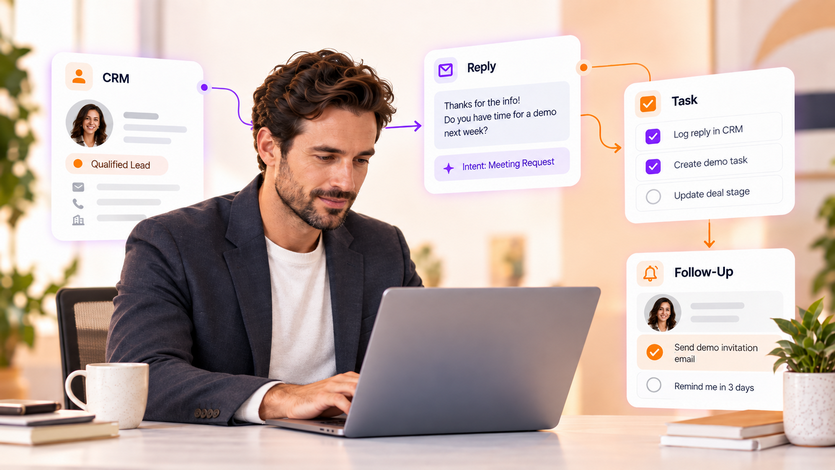
AI connects these workflows by converting unstructured context into structured decisions the automation layer can use. For instance, a model can read an email reply, determine whether the customer supplied a requested document, extract the document type, and classify the response as complete, incomplete, or requiring review. Then deterministic automation can update the CRM state and trigger the next approved action.
Common Failure Points in Cross-System Automation
Cross-system workflows fail in predictable ways. APIs time out, fields change, users bypass the intended process, messages arrive twice, and AI outputs become ambiguous. So production-ready automation needs recovery behavior, not a happy-path demo.
NIST’s AI Risk Management Framework offers a useful structure for the AI component of these workflows. Teams can govern ownership, map the use context, measure performance and risk, and manage issues across the lifecycle. Accordingly, workflow automation services should include testing and monitoring as core deliverables, not optional cleanup after deployment.
What Should Workflow Automation Services Include?
- Current-state workflow map. A clear picture of triggers, systems, users, data, decisions, wait states, and exceptions.
- Target-state design. Defined statuses, integrations, AI steps, deterministic rules, human approvals, and outcome metrics.
- System integration. APIs, webhooks, connectors, data mapping, identity, and permissions.
- AI evaluation. Representative test cases for classification, extraction, retrieval, generation, and out-of-scope behavior.
- Failure recovery. Retries, error queues, alerts, escalation paths, and manual recovery procedures.
- User enablement. Training, documentation, role expectations, and go-live support.
- Monitoring. Visibility into throughput, exceptions, errors, latency, usage, and business outcomes.
- Ongoing ownership. A named person responsible for changes, vendor updates, process drift, and optimization.
Which Metrics Show Whether the Workflow Is Working?
Measure the workflow as a business process, not only as an AI system. First, establish a baseline before automation. Then compare cycle time, manual touches, completion rate, exception rate, rework, response time, and adoption after launch. In addition, measure AI-specific quality where the model performs a material task.
For example, a document-classification model may achieve strong offline accuracy while the overall workflow still performs poorly because uploaded files fail to attach to the CRM. Therefore, leadership needs end-to-end metrics that reveal whether work actually reaches the desired outcome.
When a Dedicated AI Implementation Specialist Makes Sense
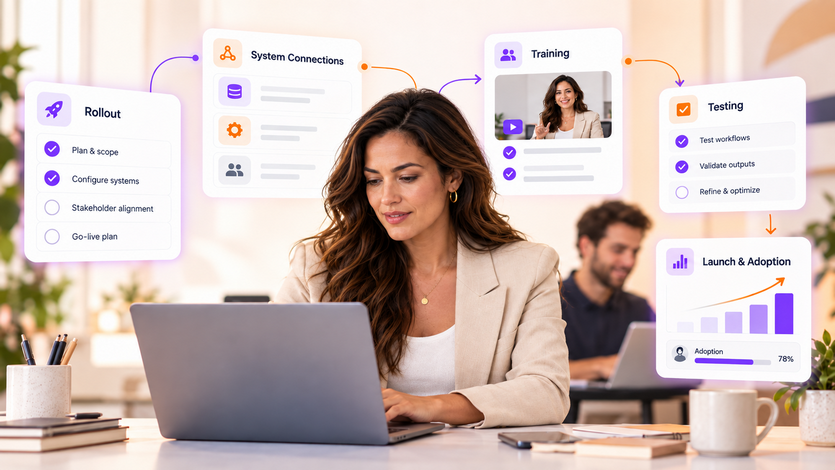
A dedicated AI Implementation Specialist becomes valuable when the technology exists, but the process still lacks ownership. This role can map workflows, coordinate system connections, define testing, train users, manage launch readiness, collect feedback, and improve the workflow after go-live. Consequently, the specialist bridges the gap between technical automation and the day-to-day operating process.
AI Virtual’s model places full-time, dedicated AI specialists inside the client’s team. The company says it can match clients with a pre-vetted specialist in three business days, and its vetted pool goes through structured screening covering technical depth, communication, and proven deployment experience. For a cross-system workflow, ongoing ownership matters because every upstream system and business rule continues to change after launch.
If you are evaluating workflow automation services, bring one process to the conversation. Document where it starts, where the authoritative record lives, which systems it touches, what documents move through it, who makes decisions, what follow-up occurs, and where work currently stalls. That operating map will speed solution design and surface the highest-value automation opportunities.
Frequently Asked Questions
What are workflow automation services?
Workflow automation services design, connect, test, and operate multi-step business processes across systems, AI components, rules, and human approvals. They typically include discovery, integration, testing, rollout, monitoring, and ongoing optimization.
How can AI connect CRM and follow-up workflows?
AI can classify inbound messages, extract structured data, summarize history, and draft context-aware responses. Automation can then update CRM status, create tasks, send approved messages, and route exceptions according to deterministic rules.
Which workflows can AI automate?
Strong candidates include intake, qualification, CRM updates, document collection and classification, internal knowledge retrieval, recurring follow-up, reporting, and routing. High-impact decisions should include appropriate human review.
How do businesses automate work across multiple systems?
Choose a system of record, define workflow states, connect systems with APIs or connectors, use event-driven triggers, validate data before state changes, log actions, and build retry and escalation behavior for failures.
What should workflow automation services include?
They should include workflow mapping, target-state design, integrations, AI evaluation, deterministic business rules, human review, failure recovery, user enablement, monitoring, documentation, and an ongoing owner.
What is the difference between process automation and workflow automation?
Process automation can refer broadly to automating business activities. Workflow automation focuses specifically on the sequence, state, handoffs, system actions, and decision points that move one unit of work from trigger to completion.
Ready to Close the Gaps You Just Found?
Get matched with an AI specialist who identifies opportunities and implements solutions that improve your operations.